Bring your own AI coding agent
Stop prompting blind.
Turn your design into a structured, per-component brief for Claude Code, Cursor,
or any AI coding agent you already use — no hallucinated UI, no re-prompting.

You bring the agent — UIPrompt brings the brief. Pairs with:
...And More
One export. Your entire project context.
UIPrompt structures your design tokens, stack, and UI frames into a single prompt — ready to paste into any AI agent, or pulled in directly through the UIPrompt connector.
fonts
spacing
- ✗No AI slop or placeholder copy
- ✗Responsive by default
- ✗Atomic component granularity
- ✗No hallucinated icons or emoji
GitHub, built in
From repo to shipped UI.
Import your app, plan every page on the canvas, and UIPrompt puts the brief in your repo, where Claude Code, Cursor or Codex picks it up. No copy and paste.
01
Import your repo
Private repos too. Pages, stack and design tokens are detected, and every route becomes an empty page ready to plan.
02
Plan on one grid
Library sections and snapping share a 12-column grid, so every page lines up like a real site, not a pile of boxes.
03
The brief lands in your repo
Open a pull request, or send it straight to main in one click.
.uiprompt/brief.mdandAGENTS.mdpoint your agent at the plan.04
See what's built
Every page shows Built or Planned straight from your repo, and the skeleton deploys to GitHub Pages with live status.
Hallucination-proof
by design.
A hallucinated component means another prompt, another retry. UIPrompt's structured context gives your agent everything it needs upfront — no guessing, no do-overs.

Loading pricing plans...
Connectors
Works inside your agent.
Add UIPrompt as a connector in Claude, ChatGPT or Codex. Your agent plans pages on your canvas, then builds from the brief. No copy and paste.
01
Add the connector
Paste
uiprompt.app/api/mcpas a custom connector in Claude or ChatGPT, or add it to Codex, Claude Code or Cursor.02
Sign in once
Approve access with your UIPrompt account. No API keys to copy, and you can disconnect any app at any time.
03
Your agent plans on your canvas
Describe a page or drop in a screenshot. Your agent lays out sections and atomic components with exact copy, right on your UIPrompt canvas.
04
Build from the brief
Your coding agent pulls the finished brief straight from UIPrompt (stack, tokens and every section in order) and builds it in your codebase.
Included in every plan · disconnect any app from your projects
Context+Prompt=Power
01
Add your context
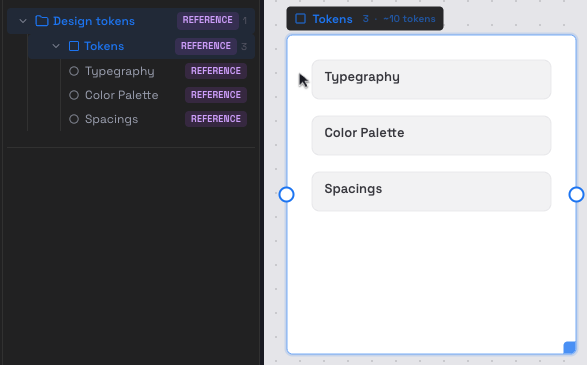
Define your design system — colors, typography, component style, and stack — so every prompt is grounded in your project.
02
Send it to your agent
Copy the brief, put it in your repo as a pull request, or let your agent pull it through the UIPrompt connector. Every component gets an AI-optimized prompt, tuned to produce the exact UI you see.
Works with your stack.
Define your frameworks, styling, components, and backend once. UIPrompt grounds every agent prompt in what your project actually uses.
 Next.js
 React
React React Native
 Expo
Expo Vite
Vite Vue
Vue Nuxt
Nuxt SvelteKit
 Remix
Remix Angular
 Tailwind CSS
 CSS Modules
 Styled Components
 MUI
MUI Ant Design
 shadcn/ui
 Radix
Radix Headless UI
 Emotion
 Chakra UI
 Panda CSS
 Supabase
 Firebase
 Prisma
 Redux
Redux pnpm
pnpm React Query
 Zustand
 Drizzle ORM
 Convex
 SWR
SWR Lucide
Start from a template.
Browse pre-built UI sections with more added continuously — Hero, Pricing, Sign-in, Data Table, Checkout, and more. Pick one, drop it on your canvas, and the full block hierarchy appears ready to prompt.
16 templates
Landing pages & conversion
6 templates
Dashboards & product screens
1 template
Shopping & checkout flows
Why prompts need context.
Real builders keep saying the same thing: better AI output comes from better context, clearer constraints, and prompts that give the model enough information to solve the task.
Sumith Puri
Engineering Leader | Java/Microservices Expert | Ex-Yahoo, Symantec, Huawei
1h
The anti-hallucination focus is interesting. Extra cards and random UI elements are a real issue. If this tool reduces that, it's quite valuable. Curious how well it performs in real use.
Irving Walawitz
Software Professional
56m
Breaking UI into sections is actually a smart move. Makes complex interfaces easier to manage. Especially useful for larger products.
Abida Khamis
Think Tanks Professional
1h
Grounding prompts in actual tech stack is a strong point. Many tools miss that context and outputs feel generic.
Chris Neal
Cannes Lion Director · ex-Paid Media Operator · Founder, CHALK
1h
Feels like a practical tool rather than just another AI wrapper. Could be useful in real workflows.
Prakash Kumar
Co-Founder of The Collective | AdMorph.AI | CS @ NUS
1h
Planning UI section by section before handing it to an AI agent actually sounds practical. Most issues come from unclear prompts. This could reduce a lot of unnecessary rework. Curious how detailed the specs go.
Juliana Marulanda
Founder, Operations Thought Leader · Helping business owners break through revenue plateaus
1h
The MCP server part sounds powerful. Direct integration with agents can save time. Curious how smooth the setup process is.
Chennakeshav (CK) Adya
Portfolio Management | AI Maven | MBA London Business School
1h
This feels quite relevant for current dev workflows. AI often adds extra UI elements that weren't asked for. Having a structured planning layer might help control that. Would like to try this on a real project.
Mauro Giacchetti
LinkedIn Trainer | Networker PRO | Financial Advisor
56m
Really like this direction. Prompt-first UI planning seems like a missing piece. Especially when switching between different AI tools. Could bring more consistency in outputs.
Corey Clark
Strategic Marketing Expert | Fractional CMO | Entrepreneur
1h
I like the tech stack support here. Context really matters when prompting AI tools. This could improve output quality for developers.
Monia Ciocioni
Communication Consultant | LinkedIn & B2B Expert
58m
This feels like a bridge between design thinking and AI execution. Planning before building usually gives better results. Makes the workflow more intentional.
Yuvraj Arora
Creative Director @ Studio Savant
1h
Feels helpful for frontend developers working with AI regularly. Could reduce back and forth during builds.
Melanie Herschorn
Done-For-You Book Writing & Publishing | Authority Builder
1h
This might speed up frontend workflows for teams using AI daily.